
↑Sorry About the Blurry Photo. It was late and I was tired.↑
A Few New Trail Markers Around Life After 60
If you’ve been wandering around Life After 60 lately, you may start noticing a few new features popping up on posts. Don’t worry, I haven’t gone completely off the rails. (At least that’s what the squirrels in the campground keep telling me.)
New Video Descriptions
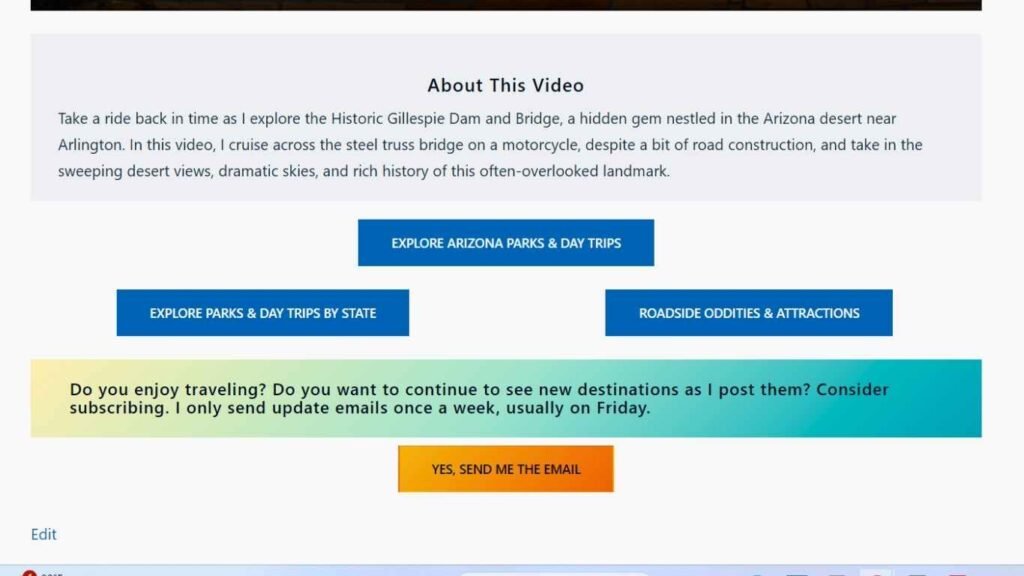
Since I’ve moved my videos from YouTube to a private platform, I discovered that readers no longer have an easy way to see a video description before hitting play. To fix that, posts that contain videos will now include a Video Description section.
This will give you a quick overview of what’s in the video so you can decide whether it’s something you’d like to watch before investing a few minutes of your valuable time.
Easier Navigation at the End of Posts
The second update is something I’m particularly excited about.
At the end of many posts, you’ll begin seeing a set of navigation buttons arranged in a triangular-style layout, well if you are on a PC or MAC. These buttons will help you jump directly to related sections of the website without having to scroll all the way back to the top menu.
Think of them as trail signs pointing you toward your next adventure, whether that’s travel, photography, technology, health, or one of the many other rabbit holes I seem to create around here.
More Improvements on the Way
These updates are part of my ongoing effort to make Life After 60 easier to use, easier to explore, and hopefully a little more enjoyable to visit.
As always, I’ll keep tinkering, testing, and occasionally breaking things in the name of progress. If something looks different, there’s a good chance it was intentional. If something looks really strange, I probably touched the wrong button.
Thanks for following along on the journey!
Dennis